Sunday, March 22, 2015

The #CUE15 Conference - Awesome!


I got home just 23 hours ago from the CUE 2015 Conference in Palm Springs. I believe it was the best CUE conference yet of the seven I have attended. I:


  • Co-presented one session with Gail Desler on "Can I Use That? Fair Use for the Remix Generation. Here are links to the session slides and session resources site. I was delighted to be asked to join Gail in this presentation. We had met through an online copyright class we both took a little over a year ago, and we met in person for the first time at the session. We took advantage of Google Hangouts and Google Slides to work together on the session. 
  • Presented a session on "Blogging Across the Curriculum." While the slides definitely don't stand alone, I'm embedding them here to "whet your appetite" to contact me and talk about blogging -:):
You can also view the slides on Google Drive at bit.ly/cue15blogging. Also, visit my "beta" Start Blogging with Students site for help getting started with blogging.
  • With Pam Oehlman, co-coordinated the CSLA Information Literacy Summit, with four dynamic presenters. Visit the CSLA website page at csla.net/ils for links to slides and resources for all these sessions. 
  • Attended tons of wonderful sessions and three incredibly inspiring keynotes
  • Co-ordinated a fun dinner for CSLA members, teacher librarians, and friends
Frankly, I'm completely exhausted! I don't have the energy right now to write up a proper report of all I learned. Thanks, though, to Storify, I can share my conference experience through the record of my tweets and those of some of the others who shared using the #CUE15 and #CUEILS hashtags. I know I'll have more thoughts on what I learned as I process and absorb all the wonderful sessions and networking. For right now, though, I hope you will enjoy my Storify story:


Many thanks to the entire CUE organization for a wonderful conference, overflowing with inspiration, learning, energy, and fun!


Friday, February 20, 2015

Report from the CSLA Centennial Conference

Selfie Taken at the Conference First Timers' Meeting
I had a jam-packed four days of learning, sharing, and networking at the California School Library Association (CSLA) Centennial Conference February 5 - 8 at the Hyatt Regency, San Francisco Airport. I came away with:
  • Notes of many great new books to purchase for the Mira Costa library from Michael Cart's workshop on "Best of the Best Young Adult Books"
  • New ideas of ways to help students become astute researchers and agents for change from author Paul Fleischman's "Eyes Wide Open: Going Behind the Environmental Headlines" workshop
  • Inspiration from opening Keynoter Michelle Luhtala to move more learning activities to where students love to be, on digital devices, and to make learning help available virtually on demand
  • Inspiration from closing keynoter Shannon Miller to implement more activities that break down the library and school walls and help students connect with the world
  • At least a year's worth of lesson and program ideas and tools to engage students from so many talented colleagues whose sessions I attended and with whom I networked
  • Excited product purchase ideas from the many wonderful vendors who support school libraries and exhibited during the conference
I also did a lot of sharing at this conference. Here is information about my four presentations:

  AASL's Best Websites

 AASL's Best Websites for Teaching and Learning: I presented this session with Sue Heraper. Here is a link to our slide deck. Of all the sites we shared, I think our attendees especially liked the hands-on demos we did of how to use two of them, Kahoot and Socrative, to quiz or survey students during lessons.

  Good Ideas!

Blogging, Digital Timelines, & More with Embedded Digital Citizenship: This was a short presentation I did to share the project for which I won a Good Ideas! Award. These awards are given for collaborative projects done by a teacher librarian and classroom teacher that can serve as a model for easy replication by our colleagues. The project I shared came from my collaborative work with Spanish Teacher Anita Rossell and her Spanish for Native Speakers Class. Here is the link to my slides for this talk. I will also be talking at more length about blogging at the CUE conference next month.

Going for Moonshot Thinking

Going for Moonshot Thinking: The Latest from Google from Two Googly Teachers: Amy McMillan, a middle school English teacher working on her teacher librarian credential, and I met at the Google Teacher Academy in Mountain View last summer. We co-presented this session to share some of our takeaways from the Academy and to encourage more teacher librarians to apply to attend future academies. As with almost every session I present, we learned so much more as we prepared and compared notes on our different practices. Here is a link to our slides. We also recorded this session using Google Hangouts on Air:


 Make Twitter Your #1 Tool for Building a Personal Learning Network: Marie Slim and I prepared this session, an update of one we did last year. We are both passionate about the value of Twitter for learning and wanted to get more of our members on board using it at conferences and for learning and networking throughout the year. Unfortunately, Marie wasn't able to be at the conference, so I did the presentation on my own. Here is a link to the session presentation Prezi. I also recorded this session with Google Hangouts on Air:


 As Social Media/Website Chair for the conference, I did a lot of tweeting and encouraged tweeting by all our participants. In fact, I taught a four-week course on Twitter (which the presentation above was a short summary of) to help prepare more members to tweet during the conference. Although the course is now done, all the material is available to read and use on the course website. One great use of Twitter is to share highlights of conference sessions and events. Here is a Twitter summary of the conference, captured using Storify. You can see as you scroll through the tweets that, while we work very hard learning at conferences, we also have a lot of fun! This conference was CSLA's Centennial, so it also included a wonderful Gala celebration of this amazing milestone.
This posting is cross-posted on the Mira Costa High School Library bog,

Wednesday, February 4, 2015

CSLA Conference


Just one day to go before the California School Library Association Conference! There are so many wonderful activities going on there. I know I will be wanting to clone myself and attend just about every concurrent session. You won't, of course, want to miss the keynotes by Michelle Luhtala and Shannon McClintock Miller, the Gala with Delaine Eastin, the Legi Session with Bob Wise, or any of the other special events.Visit bit.ly/csla100 for all the details. 

Every year it seems that someone posts a "shameless self-promotion" of their session on CALIBK12, CSLA's listserv. Unless I missed something, I haven't seen any yet this year. So, I"m a bit late to the game, but in that spirit, I'm going to share the sessions I'm personally involved in. And, remember, "self-promotion" of what you do for school libraries is all part of advocacy, right? 

On Thursday at 4:15pm-5:15pm, Immediate Past President Janice Gilmore-See and I will be hosting a "First Timer's Meeting," where we will share tips to make the most of your first conference. We hope to get to meet many new attendees there. Another great thing about this session, is that you will get to meet other conference-goers. 

On Friday night at 9:15pm in the Bayside Room (right after the fabulous Centennial Gala), you don't want to miss our second annual "Unconference." This is an informal opportunity for YOU to determine the topics, share your expertise, and learn from your colleagues. Rumor has it that there will also be wine and chocolate to share. Some of last year's attendees thought the Unconference was a highlight of the conference! Check this link for all the details. And, ask me for an Unconference sticker or button when you see me. You can view the graphic now in the sidebar, and feel free to copy it, tweet it, and share in any other way.

On Saturday at 10:00am in the Poolside Pavilion, Sue Heraper and I will be sharing about "AASL's Best Websites for Teaching and Learning." You'll come away with ideas of how to use some very cool sites in your library and with teachers and students to enhance learning.


On Saturday at 3:00pm in Grande Pavilion EFG1/2D, I'll be one of this year's three Good Ideas! winners sharing about my collaborative project with a classroom teacher. I will share about students blogging as part of their Spanish class curriculum and why blogging has been so valuable for them, and can be for your students. This collaborative concept could be replicated in virtually any discipline and at any age level. You'll also get to hear about Korrie Krohn's and Ellie Goldstein-Erickson's great collaborative projects. You will also hear about Good Ideas! from session host RenĂ©e Ousley-Swank, Chair of the Standards and Integration Committee. 

Then, on Sunday at 8:00am in Sandpebble E, Amy McMillan, one of my cohort members from the 2014 Google Teacher Academy in Mountain View, and I will be presenting "Going for Moonshot Thinking: The Latest from Google by Two Googly Teacher." You will get to hear some of our best take aways from our Google Teacher Academy experience, and learn more about why you should apply for a future academy. 

Finally, at 9:00am in Harbor B, Marie Slim and I will be sharing how to "Make Twitter Your Number One Tool for Building Your Personal Learning Network." We're both passionate about the value of Twitter for personal learning, networking, and more, and we want to convince you to get on board! 

I hope to see you at the conference and at some of these sessions. :-) 


Saturday, December 27, 2014

Promoting Tweeting to CSLA Members Through My Online Course

Learn 2 Tweet

I am a huge fan of using social media to interact with my peers and build my professional skills. I participate on a daily basis in a variety of social media as part of my Personal Learning Network (PLN). I feel guilty if I let a day go by without checking my blog reader for new blog postings, my Google+ feed, Twitter feed, email, and more.  While I consider all these essential tools for keeping up with the latest ideas for my practice as a teacher librarian, Twitter is definitely my Number #1 favorite PLN tool. It is also a dynamite tool for enhancing my experiences at conferences. In fact, I rarely take notes at conference sessions any more. Instead, I tweet key points I hear during sessions and follow the tweets of other attendees, and these become my notes to look back to as I process my experiences.

In order to share my enthusiasm for the value of Twitter with my fellow CSLA (California School Library Association members), I have developed and am offering a free four-week online class, “Learn 2 Tweet: Build your Twitter talent 140 characters at a time” during the month of January. It starts January 5, and will run through February 1.  I timed it with the idea of preparing CSLA members attending the Centennial Conference in February to be active tweeters during the conference and to use it as a key PLN tool after that, but the course is open to anyone who either has never been on Twitter or who wants to come up to speed on using this social networking and personal learning network tool effectively.

To enroll in the course, fill out this Google form:
Or,  use this link:bit.ly/twitterclassenroll.

And, of course, be sure to register for the CSLA conference if you haven't already!

For more information about the course, visit the course site or contact me with questions. Please don’t delay signing up, as I am limiting enrollment to allow support of all participants.

I'm looking forward to getting to work with all the course enrollees in January! In the meantime, you can find me on twitter at @jane_librarian.

I'll blog about how the course is going in the coming weeks. 

Wednesday, November 26, 2014

Why I Love Canva


(Note: This posting is cross-posted from the AASL Blog.)


l love canva.png
While these days we are blessed with a variety of excellent web-based graphics tools, Canva.com, one of AASL’s Best Websites for Teaching and Learning for 2014, definitely stands out from the crowd. It has become my first choice stop when I need to create an original graphic, even with Photoshop Elements installed on my computer. You will want to use it yourself and also encourage your students and teacher colleague teachers to as well.

Here are some reasons why:


  • It’s free.
  • It is completely web-based and platform independent.
  • It is super easy to use.
  • It offers a huge collection of vibrant backgrounds, shapes, and graphics, and also allows you to upload your own.
  • Along with the free graphics, you can opt for a large collection of paid options, each of which is just $1.00.
  • It has 21 pre-sized templates - for example: presentations (1024px x 768px), Instagram (640px x 640px), and more -  but also allows you to create a custom-sized graphic. And for all graphics, you can design a single image, or multiple pages.
  • Created graphics can be shared directly to Twitter or Facebook, downloaded as pdfs or png files, or shared with either a read-only or even editable link. (The person receiving the link needs to open a Canva account to view and edit the image.) And, all your creations remain available for further editing on the Canva site.
  • The help information is extensive, and, in addition, Canva’s “Design School” includes  both lessons and interactive tutorials on principles of design you can use on your own and share with students. You can even subscribe to the tutorials and get weekly design lessons via email.


To get started using Canva, open a free account. Then, you can just dive in, start with one of the tutorials (such as this lesson, which can also serve as a class lesson), or check out this great screencast on Heather Moorefield-Lang’s TechFifteen YouTube channel recently made by Meg Coker.


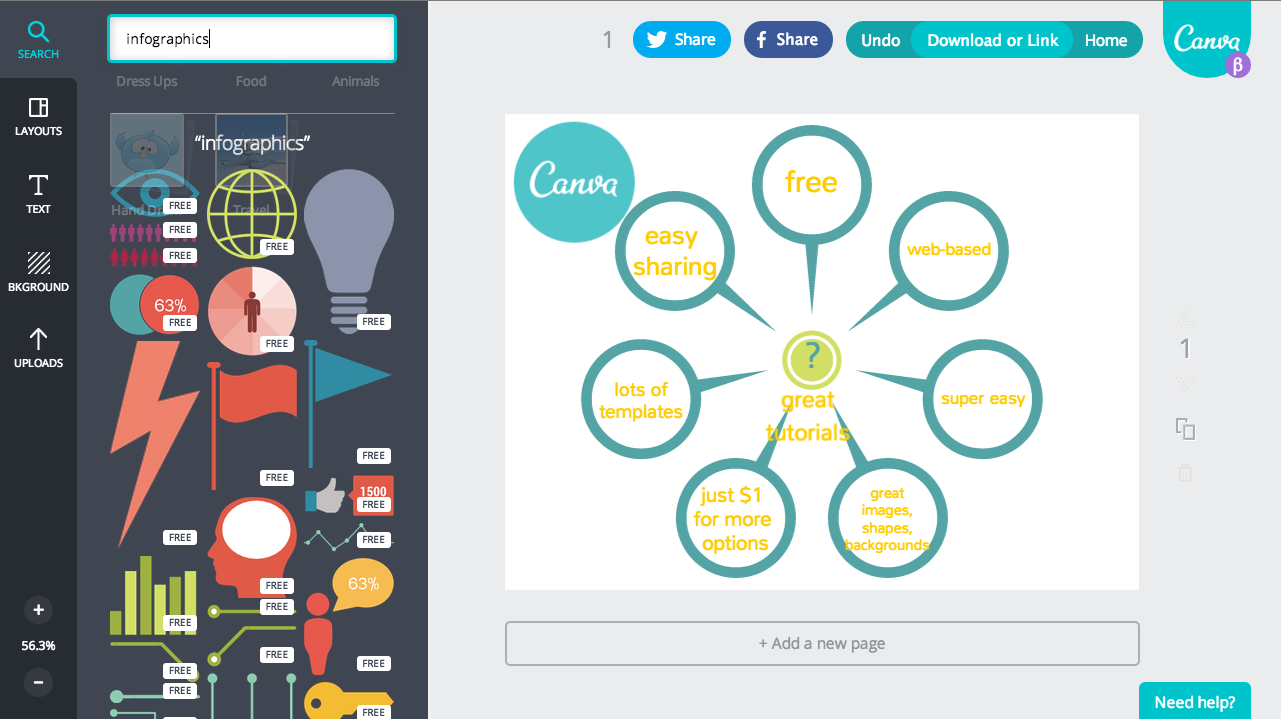
A good activity for using Canva with your students might be for an assignment creating an infographic. Canva offers a ton of attractive images for infographics. Just use the Search box to search for “infographics” as a keyword. Look on the left of this screenshot to see some of the infographic symbols available:


Screen Shot 2014-11-23 at 9.20.06 AM.png


For some examples of infographics made with Canva, watch California School Library Association’s new film, “Does Your School Have a Teacher Librarian?” All the infographics were made by Karen Morgenstern, the film producer, using Canva. The title screen was also created with Canva:


You might also want to encourage students to create class slide presentations using Canva. While using this Canva, they can take advantage of the extensive built-in design elements and the design tutorial assistance to improve the visual quality of their presentations. Canva lacks the real time collaboration option of Google Slides/Presentations, but the link sharing feature will allow for asynchronous editing. Students could also create graphics in Canva and import them into Google Slides.


Just two caveats to remember when using Canva. First, it does require establishing a free account, and users must be 13 or older. And, second, If you pay for one or more $1 stock media items as part of one of your designs, you can only use that stock media in one of your Canva designs and you’re not allowed to later edit the PDFs or PNGs or give others permission to use them. I personally avoid using the paid media items for my educational creations, not because of the cost, which is so reasonable at $1 a piece, but because I can’t then assign the material containing the design a Creative Commons license to pass the rights to use it on to others.


And, some great news: Canva is now also an iPad app. Check out either the web-based version or the app today!

And more news .... Just since my posting was published on the AASL Blog yesterday, I learned that Canva now allows you to customize your profile, share your favorite designs with others, and follow friends' designs. Here's a video from Canva about it:


I'm working on my profile now. :-)


Tuesday, November 11, 2014

#SLJSummit 2014

In October, I had the great opportunity to attend School Library Journal's annual Leadership Summit in St. Paul, MN. I wrote a posting about this event in my school library blog, focusing specifically on some of the many tie-ins to Common Core. You can see that post at this link.

This posting is a more personal account, a Storify collection of my Twitter tweets, favorites, and RTs, that, these days, serve as my "notes" when I attend a conference. There were so many wonderful ideas, and I know these "notes" are often very shorthand. Please contact me to better explain any of them.


And here are some photos I took to help me remember a wonderful trip:

Created with flickr slideshow.

Monday, November 10, 2014

New CSLA Advocacy Film

I have been neglecting this blog of late. I have - based on motivation from Nikki Robertson, a true TL rock star, been working hard this school year to try to document all the activities in my library in my Mira Costa Library blog, so please do check out my recent postings in there. Still, I am sorry that I haven't been posting my more personal thoughts more regularly here. I do, tonight, have something BIG to share: it's that the California School Library Advocacy film, in the works for almost a year now, is now complete! If you are on social media, you already saw it this weekend, but I still want to be sure to document it here:


Please watch it and then share it far and wide! Our administrators, parents, teachers, students, politicians, and any other stakeholders all need to see it to help them understand why our students need us teacher librarians to teach them vital information literacy skills while also nurturing their personal passions and to integrate technology into the curriculum and provide professional development to our schools and districts. The film also provides statistics about the sad state of staffing in our California school libraries.

I feel proud to have been the one to initiate the effort to make this film while I was CSLA President and was inspired by the Washington Library Media Association film, but it was Karen Morgenstern, our incredibly talented and hard-working member and producer, who made it happen. She tapped James Gleason, our cameraman, TerryKhai Ngo, his assistant and editor, and Lilly Aycud and Marc Stuart, who provided the score.

As Karen wrote on the CALIBK12 listserv this morning, "I hope this film can help increase our numbers, our influence and our visibility, as well as be an effective advocacy tool for school librarians and school libraries in other states."

I already shared the "back story" with Joyce Valenza this morning for her blog, so please check that out, and also watch and take advantage of the other excellent advocacy videos she has assembled there. And, please, spread the word for the sake of our students!