Saturday, December 27, 2014

Promoting Tweeting to CSLA Members Through My Online Course

Learn 2 Tweet

I am a huge fan of using social media to interact with my peers and build my professional skills. I participate on a daily basis in a variety of social media as part of my Personal Learning Network (PLN). I feel guilty if I let a day go by without checking my blog reader for new blog postings, my Google+ feed, Twitter feed, email, and more.  While I consider all these essential tools for keeping up with the latest ideas for my practice as a teacher librarian, Twitter is definitely my Number #1 favorite PLN tool. It is also a dynamite tool for enhancing my experiences at conferences. In fact, I rarely take notes at conference sessions any more. Instead, I tweet key points I hear during sessions and follow the tweets of other attendees, and these become my notes to look back to as I process my experiences.

In order to share my enthusiasm for the value of Twitter with my fellow CSLA (California School Library Association members), I have developed and am offering a free four-week online class, “Learn 2 Tweet: Build your Twitter talent 140 characters at a time” during the month of January. It starts January 5, and will run through February 1.  I timed it with the idea of preparing CSLA members attending the Centennial Conference in February to be active tweeters during the conference and to use it as a key PLN tool after that, but the course is open to anyone who either has never been on Twitter or who wants to come up to speed on using this social networking and personal learning network tool effectively.

To enroll in the course, fill out this Google form:
Or,  use this link:bit.ly/twitterclassenroll.

And, of course, be sure to register for the CSLA conference if you haven't already!

For more information about the course, visit the course site or contact me with questions. Please don’t delay signing up, as I am limiting enrollment to allow support of all participants.

I'm looking forward to getting to work with all the course enrollees in January! In the meantime, you can find me on twitter at @jane_librarian.

I'll blog about how the course is going in the coming weeks. 

Wednesday, November 26, 2014

Why I Love Canva


(Note: This posting is cross-posted from the AASL Blog.)


l love canva.png
While these days we are blessed with a variety of excellent web-based graphics tools, Canva.com, one of AASL’s Best Websites for Teaching and Learning for 2014, definitely stands out from the crowd. It has become my first choice stop when I need to create an original graphic, even with Photoshop Elements installed on my computer. You will want to use it yourself and also encourage your students and teacher colleague teachers to as well.

Here are some reasons why:


  • It’s free.
  • It is completely web-based and platform independent.
  • It is super easy to use.
  • It offers a huge collection of vibrant backgrounds, shapes, and graphics, and also allows you to upload your own.
  • Along with the free graphics, you can opt for a large collection of paid options, each of which is just $1.00.
  • It has 21 pre-sized templates - for example: presentations (1024px x 768px), Instagram (640px x 640px), and more -  but also allows you to create a custom-sized graphic. And for all graphics, you can design a single image, or multiple pages.
  • Created graphics can be shared directly to Twitter or Facebook, downloaded as pdfs or png files, or shared with either a read-only or even editable link. (The person receiving the link needs to open a Canva account to view and edit the image.) And, all your creations remain available for further editing on the Canva site.
  • The help information is extensive, and, in addition, Canva’s “Design School” includes  both lessons and interactive tutorials on principles of design you can use on your own and share with students. You can even subscribe to the tutorials and get weekly design lessons via email.


To get started using Canva, open a free account. Then, you can just dive in, start with one of the tutorials (such as this lesson, which can also serve as a class lesson), or check out this great screencast on Heather Moorefield-Lang’s TechFifteen YouTube channel recently made by Meg Coker.


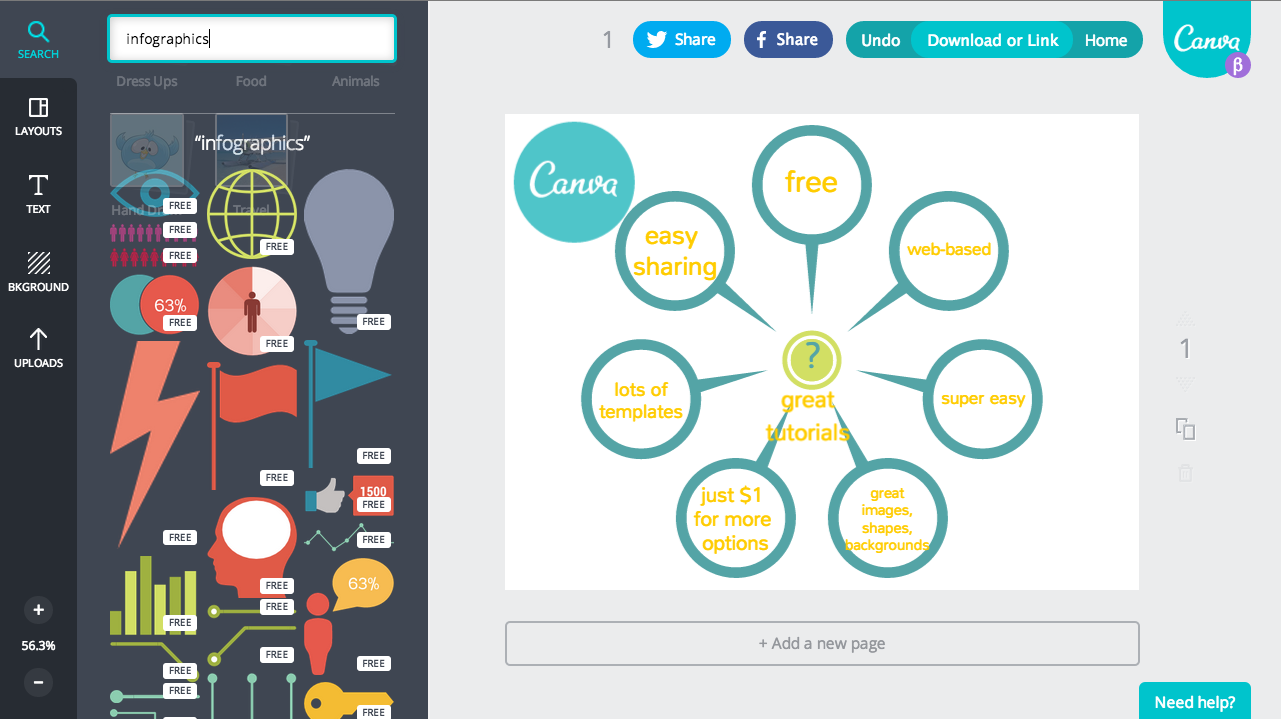
A good activity for using Canva with your students might be for an assignment creating an infographic. Canva offers a ton of attractive images for infographics. Just use the Search box to search for “infographics” as a keyword. Look on the left of this screenshot to see some of the infographic symbols available:


Screen Shot 2014-11-23 at 9.20.06 AM.png


For some examples of infographics made with Canva, watch California School Library Association’s new film, “Does Your School Have a Teacher Librarian?” All the infographics were made by Karen Morgenstern, the film producer, using Canva. The title screen was also created with Canva:


You might also want to encourage students to create class slide presentations using Canva. While using this Canva, they can take advantage of the extensive built-in design elements and the design tutorial assistance to improve the visual quality of their presentations. Canva lacks the real time collaboration option of Google Slides/Presentations, but the link sharing feature will allow for asynchronous editing. Students could also create graphics in Canva and import them into Google Slides.


Just two caveats to remember when using Canva. First, it does require establishing a free account, and users must be 13 or older. And, second, If you pay for one or more $1 stock media items as part of one of your designs, you can only use that stock media in one of your Canva designs and you’re not allowed to later edit the PDFs or PNGs or give others permission to use them. I personally avoid using the paid media items for my educational creations, not because of the cost, which is so reasonable at $1 a piece, but because I can’t then assign the material containing the design a Creative Commons license to pass the rights to use it on to others.


And, some great news: Canva is now also an iPad app. Check out either the web-based version or the app today!

And more news .... Just since my posting was published on the AASL Blog yesterday, I learned that Canva now allows you to customize your profile, share your favorite designs with others, and follow friends' designs. Here's a video from Canva about it:


I'm working on my profile now. :-)


Tuesday, November 11, 2014

#SLJSummit 2014

In October, I had the great opportunity to attend School Library Journal's annual Leadership Summit in St. Paul, MN. I wrote a posting about this event in my school library blog, focusing specifically on some of the many tie-ins to Common Core. You can see that post at this link.

This posting is a more personal account, a Storify collection of my Twitter tweets, favorites, and RTs, that, these days, serve as my "notes" when I attend a conference. There were so many wonderful ideas, and I know these "notes" are often very shorthand. Please contact me to better explain any of them.


And here are some photos I took to help me remember a wonderful trip:

Created with flickr slideshow.

Monday, November 10, 2014

New CSLA Advocacy Film

I have been neglecting this blog of late. I have - based on motivation from Nikki Robertson, a true TL rock star, been working hard this school year to try to document all the activities in my library in my Mira Costa Library blog, so please do check out my recent postings in there. Still, I am sorry that I haven't been posting my more personal thoughts more regularly here. I do, tonight, have something BIG to share: it's that the California School Library Advocacy film, in the works for almost a year now, is now complete! If you are on social media, you already saw it this weekend, but I still want to be sure to document it here:


Please watch it and then share it far and wide! Our administrators, parents, teachers, students, politicians, and any other stakeholders all need to see it to help them understand why our students need us teacher librarians to teach them vital information literacy skills while also nurturing their personal passions and to integrate technology into the curriculum and provide professional development to our schools and districts. The film also provides statistics about the sad state of staffing in our California school libraries.

I feel proud to have been the one to initiate the effort to make this film while I was CSLA President and was inspired by the Washington Library Media Association film, but it was Karen Morgenstern, our incredibly talented and hard-working member and producer, who made it happen. She tapped James Gleason, our cameraman, TerryKhai Ngo, his assistant and editor, and Lilly Aycud and Marc Stuart, who provided the score.

As Karen wrote on the CALIBK12 listserv this morning, "I hope this film can help increase our numbers, our influence and our visibility, as well as be an effective advocacy tool for school librarians and school libraries in other states."

I already shared the "back story" with Joyce Valenza this morning for her blog, so please check that out, and also watch and take advantage of the other excellent advocacy videos she has assembled there. And, please, spread the word for the sake of our students!

Friday, September 26, 2014

Why TLs should apply to attend the next #GTA


I just saw that applications are open for the next U.S. Google Teacher Academy (#GTA). It will be in Austin December 2-3, and the applications are due October 13. Back in August, I wrote about my experience at the #GTA in Mountain View in July. If anything, I am more energized and inspired now than when I left there, as I begin to process and apply ideas I got there. It has also enriched my PLN (personal learning network) with more than 70 wonderful new connections, between the attendees and the organizers. I am, frankly, focusing this post on my Teacher Librarian friends as the audience; I want those of you who haven't yet had this experience to apply and attend. Here's a few reasons why I think you will find it valuable, followed by a few reasons why, if I had my way, the cohort would be flooded with TLs!

Here are just five of what could be many reasons why you'll find attending a Google Teacher Academy valuable:
  • You will see great examples of new and better ways to engage students, and help them explore their passions, learn to solve problems, and prepare for their futures
  • You will become part of a cohort of enthusiastic people you can network with and share ideas with, and, yes, be intimidated, but in a good way, by all their talents
  • You will be infected with Google's "can do" attitudes and teamwork models 
  • You will be inspired to share your new ideas and expertise with your colleagues, PLN, and the world
  • You'll be pushed to be a Moonshot thinker!
The Googlers and other organizers at my academy told us what they are looking for in Google Certified Teachers. They are: 
  • Outstanding educators with a passion for using innovative technologies and approaches to improve teaching and learning, 
  • Creative leaders who understand opportunities and challenges, and have a desire to help empower others in their local community and beyond, 
  • Ambassadors for change who model high expectations, life-long learning, collaboration, equity, and innovation. 
And, here's why we should have lots of teacher librarians in this next and every cohort:
  • Don't those three characteristics above sound exactly like every good teacher librarian you know? Teacher librarians are naturals for this!
  • We need Googlers, the other cohort members, and all our fellow educators to see what we TLs do and how much our expertise contributes to positive change.
  • A big theme of the academy was the value of team work. We teacher librarians are not just leaders, we are also excellent collaborators and team players. 
  • We are experts at spreading the word, both right at home and far and wide, about any new ideas and tools we find valuable. If you love Google like I do, you will learn more about what you love and then share that with the rest of of your TL and educator PLN.
  • You'll love the experience! 
And, don't worry if you don't have a lot of expertise in filmmaking. (A one-minute film is one of the requirements.) I made mine with GoAnimate and just background music, for audio so I didn't have to speak or act. :-)

So, do consider applying to the Austin Google Teacher Academy. Okay? 


Sunday, September 7, 2014

Join Our #SWVBC!


Just about three years ago, Joyce Valenza shared in her Neverending Search blog the idea that she and Shannon Miller came up with to connect their school library book clubs into a “somewhat virtual book club” for joint discussions. And, she generously invited other TLs to participate. I was one of the readers who responded asking to participate. And, in October 2011, we had our first virtual event. You can read my reflection on our early meetings in my December 2011 blog posting.


We’ve experienced a variety of bumps in the road keeping this going, but I am so proud of my students and of all the students who have participated and shared their insights on reading with other students across the country. It was also especially exciting for all of us to have authors accept our invitations to talk with us. Many thanks to Libba Bray, Lauren Myracle, and Ellen Hopkins for joining us! Regular TL and student participants over the last three years have included Joyce Valenza’s Springfield Township High School in Springfield Township, PA;  Shannon Miller’s Van Meter Community Schools in Van Meter, IA; Michelle Luhtala’s New Canaan HS in New Canaan, CT; Colette Cassinelli’s La Salle Catholic College Prep in Milwaukee, OR; Cathy Jo Nelson’s Dorman HS in Roebuck, SC; and Debbie Bobolin’s James Caldwell HS in West Caldwell, NJ.


And, this year, the “Somewhat Virtual Book Club” (#SWVBC) is ready to expand, and we invite YOU to join us.


Here’s the plan so far:


  • Each monthly meeting will be hosted by a different school, and the students at that school will take ownership of both running the technology and serving as moderators. We TLs all love running things, but we want to empower our students with those skills.


  • The books selected will be for a high school audience, but middle schools are, of course, more than welcome to join discussions for any of the books that interest them.


  • As with regularly-scheduled webinars like TL Virtual Cafe, you and your students are welcome to be regular, occasional, or even just one-time participants.


  • We plan to use Google+ Hangouts as our meeting platform. For the last couple of years and a lot of experimentation, we have been on Blackboard Collaborate, and have really appreciated the stability of that platform. This year, though, we want to try software that we know students will have access to on their own. That, way they can leverage what they learn about using the software during our meetings to lead virtual meetings in other contexts. We are aware that Google+ Hangouts is limited to 10 participants. Should we exceed that number at meeting, those unable to join the Hangout can still participate by viewing the live stream and contributing to the chat. And, we are, of course, flexible, and can modify our plans if circumstances call for doing so.


  • The tentative schedule for the year thus far includes:


    • September 17, 3:30 PM PT/6:30 PM ET: The Fault in Our Stars by John Green, hosted by New Canaan HS, New Canaan, CT
    • October 8, 3:00 PM PT/6:00 PMT ET: All Our Yesterdays by Cristin Terrill, hosted by Mira Costa HS, Manhattan Beach, CA
    • November 5, 3:00 PM PT/6:00 PMT ET: We Were Liars by E. Lockhart, hosted by Cambridge HS, Cambridge , MA
    • December 3, 3:00 PM PT/6:00 PMT ET: considering Butter by Erin Jade Lange or The 5th Wave by Rick Yancy, hosted by Dorman High School, Roebuck, SC
    • January 7, 3:00 PM PT/6:00 PMT ET: book & host TBD
    • February 11, 3:00 PM PT/6:00 PMT ET: book TBA & hosted by La Salle Prep, Milwaukie, OR
    • March 11, 3:00 PM PT/6:00 PMT ET: book & host TBD
    • April 8, 3:00 PM PT/6:00 PMT ET: book & host TBD
    • May 6, 3:00 PM PT/6:00 PMT ET: book & host TBD
    • June 3:00 PM PT/6:00 PMT ET: book & host TBD


  • If you are another librarian or club member out there reading this, please contact me if your school would like to grab one of the open sessions. Also, feel free to invite the author to join us if you can.


  • Also contact me if you simply want to join in; we’ll set you up with the links for the sessions.


  • In addition to this monthly schedule of book discussions, we have several social media platforms we hope to “grow” this year for “any time book” discussions, news, and announcements:


  • And, please don’t worry if your club, or “club trying to happen” is small. That’s the benefit of connecting virtually; it gives our students the opportunity to connect with other readers even when you only have a small group at their own school.

Hope to see you online!

MCHS Library Orientations Underway!


If you know me, you know that I am a HUGE believer in the value of blogging. I promote blogging to both teachers and students, and I have two blogs: this one, and my library blog. My Google Teacher Academy is about blogging, so you will be hearing a lot more about that from me soon.

I have two blogging problems:

  • I never seem to be able to get to posting as often as I want, and I often end up "skipping" topics because I didn't get to them in a timely fashion and then decide it's too late. :-(
  • I regularly have the dilemma of not being able to decide which of my two blogs to post to. 
So, this posting isn't about how I solved either problem, although I wish I could! It is simply to tell you that I just did a posting this morning on my library blog I hope you'll read if you are interested in how I redesigned Day 2 of my library orientation this year to go completely paperless and to include several of the concepts I came away from the Google Teacher Academy with: 
  • have students work in teams (I had been doing that part already)
  • don't over-explain how to do things, 
  • make it fast-paced by limiting the time to accomplish tasks, 
  • and have students share out what they learned or did at the end
And, yeah, it also incorporates some great Google tools, including Google's latest, Google Classroom. 


And, standby for my next posting about the Somewhat Virtual Book Club. I'm going to do that one on this blog. Thanks for reading!