Monday, July 14, 2014

ALA 2014 Highlights - #ALAAC14 Part 2

In my last post, I wrote about some of my personal highlights from Friday and Saturday at the American Library Association Conference in Las Vegas. In this post, I will share some take aways from Sunday and Monday.

Paul Rusebagina 

Sunday morning, I attended a breakfast generously hosted by Alexander Street Press, with guest speaker Paul Rusebagina, the hotel manager who protected over 1,200 refugees during the Rwandan Genocide in 1994 and whose story is dramatized in the film "Hotel Rowanda." Here is a recording that was made at the breakfast: 


I look forward to reading and adding his autobiography, An Ordinary Man, to my library collection. It describes his background and courage during the genocide. I know, based on his talk that morning, that it will be inspiring to my students to learn about how even one person can make a difference in the face of incredible adversity.

IRRT Panel on Expanding the School Library Program

One of the sessions I attended Sunday afternoon was an International Relations Round Table panel on "Expanding the School Library Program: Connecting Students with Students, Across International Boundaries, Using Modern Technology."  Carol Brey-Casiano shared about exchange programs available through the U.S. Bureau of Educational and Cultural Affairs and ALA's sister city program. George Braez shared practical tips from his experiences connecting students at his school since 1996.

And Joyce Valenza, who constantly inspires me with new ideas and motivates me to want to do more, shared that "We are at a point where we can easily connect students from all over the world for really meaningful inquiry." Even language is no longer a barrier; she showed us a video demo in which two people were conversing online together in different languages using a real time translation tool developed by Microsoft and Skype. Here are the slides from her talk:


Global TL: Librarians without Borders from Joyce Valenza

She invited us to join a Google+ community she recently established: Global TL: Librarians without borders to make connections and create meaningful networked learning opportunities for our students. I am already a member of the group and getting lots of ideas of new ways I can build connections for my students next fall. Do join, if you haven't already, and use the #GlobalTL hashtag when you post on Twitter. She reminded us that "Librarians are the ones to hit the start button on global connections in schools. We are the scouts."

Play, Play, Learn: Games and the Common Core Library

Chris Harris's session on Monday sold me on the value of finding and sharing board games as learning tools. Chris shared a large variety of games, all tied to Common Core Standards skills. Here is a link to his presentation slides and to his new PlayPlayLearn.com website. After seeing his talk, I was inspired to start a collection at my library. I was excited right after I returned from the conference to get a notice through the AASLForum about International Gaming Day @Your Library on November 15. I signed up indicating my plans to participate, and the signup form offered the option of requesting lots of free games from manufacturers. These will help me jumpstart my collection. I'm getting off topic here, but one of the activities for International Gaming Day I'm especially intrigued by is the Global Gossip Game that will be part of the day. Since International Gaming Day is on a Saturday, I am hoping that there will be a way to participate in the Global Gossip Game on the Friday before or Monday after. I feel pretty confident that my connections with the GlobalTL group can make that happen!

Odyssey Awards

Monday's program also included the Odyssey Awards, which recognize outstanding audiobooks for children and young adults. There was one winner, Scowler, and four Honor books. At the event, we got to listen to the narrators of the winning and honor books perform a segment of their books live. I had only listened to one of the honor books so far, Eleanor & Park, and was delighted to get to hear narrators Rebecca Lowman and Sunil Malhotra, both of whose voices I had come to love, talk about the book and then read from it.

The surprise highlight of the event was seeing Kirby Heyborne, Scowler narrator, perform a rap librarian appreciation song. Here is a recording:


The conference had so much more to offer than I have covered here. I know I will be drawing from my experiences there throughout the coming year. I will also be checking ALA's YouTube highlights video archive and the sessions with handouts in the coming weeks, and looking forward to the full-video recordings of selected sessions coming soon for conference attendees.


Saturday, July 5, 2014

ALA 2014 Highlights - #ALAAC14

with conference buddy and roommate Jessica Gillis
ALA 2014 Highlights

This year's American Library Association conference was both wonderfully-inspiring and incredibly overwhelming. So many sessions go on simultaneously, making choices pretty stressful! And, Las Vegas to me is a surreal and pretty uncomfortable place. The weather is unbearably hot, it seems that every hotel is designed to prevent you from finding your way out of the casinos to the meeting rooms, and the distances between one meeting venue and another are deceptively far. While I can't say I enjoyed the city, I do want to thank the local people for being consistently friendly. I also want to thank all the many, many ALA and divisions staff, leaders, and volunteers who worked so hard to make the conference an incredibly enriching experience for all of us who attended.

Although I know the minute I publish this, I'll fret about what I left out that was also great, but here are a few of the conference highlights for me:

21st Century Teens: Literacy in a Digital World

I spent the day Friday at a YALSA-sponsored workshop on "21st Century Teens: Literacy in a Digital World." There was lots of great material at this workshop, but the most engaging parts for me were the author talks and panels. I got to hear several authors of whom I'm alread big fan - Neal Shusterman, Scott Westerfield, and David Levithan - and I now have three-new-to-me authors at the top of my "must read" list: Lindsey Leavitt, Erin Lange, Marie Liu, and Graham Salisbury.

Kathryn Lewis, Chair of the AASL/ALSC/YALSA Common Core Task Force, kicked off the day with advice and insight on Common Core implementation. Not surprisingly to any of us librarians, she shared that "students need opportunities to stretch their reading abilities but also to experience the satisfaction and pleasure of easy, fluent reading." We librarians certainly must help provide the stretch reading, but we also need to champion students' right to read what they want to read and the profound value of reading what they enjoy. She encouraged us to visit the Common Core toolkit information on the AASL site.

Authors Lindsey Leavitt, Neal Shusterman, and Scott Westerfield participated in a panel moderated by Librarian Jack Bauer on "Click Here: Teens, Technology, and Literacy" which explored the impact of social media options on how teens communicate with each other. As an example of the power of social media, Shusterman shared that he discovered teens creating Twitter accounts for his book characters and tweeting in their voices. They did such a good job that he hired them to continue doing so professionally! Westerfield noted that one of the most important things libraries do is to create safe places for teens. He shared how teens use his forums to discuss all sorts of subjects, not necessarily related to his books, since they take advantage of it as a safe place.

Author Erin Jade Lange spoke to us about the intersection of social media and bullying.  She explained that she was bullied as a child. She cited cases of Alzheimer patients who have lost the memory of who family memories, are but still remember the details of bullying. "It sticks with you forever," she explained. Today, though, she explained, kids carry their tormentors in their pockets; they can't get away from it. Explaining why she writes books that include this cruelty, she shared that reality is worse than fiction; she writes to create stories with a new edge of hope. I have her newest book, Dead Ends, right near the top of my summer reading stack.

Authors David Levithan, Marie Liu, and Graham Salisbury participated in panel moderated by Librarian Walter Mayes on "Diversity in Literature." Some takeaways from that panel included Levithan's statement that our goal should be to lead kids to books that teach them about the world, not necessarily that are about them. Salisbury shared that a key to getting more diverse literature is getting kids to read more and become writers. It's dangerous, Marie Liu stated, to talk about books with diverse elements as "special interest"; they are for everyone. To experience diversity, Levithan said, you need to read a lot of books. I couldn't resist asking David Levithan if I could have my photo taken with him since I have enjoyed so many of his books myself and seen them resonate with my students:


I usually try to "sample" authors and then move on, so that I have knowledge of as many different authors to share with my students as possible. I clearly "broke that rule" this school year when I read three different books by Levithan: Every Day, Two Boys Kissing, and Invisibility. (Invisibility was co-authored with Andrea Cremer.) I really couldn't tell you my favorite; I loved them all. 

Printz Awards

Friday also included another conference highlight for me, the Printz Awards. Marcus Sedgwick, author of Midwinterblood, the 2014 Printz Award book, shared how his local library was a safe haven for him as a child. He told us that our reading experiences as children determine not just what we read as adults, but, more importantly, whether we read at all. So helping children discover the love of reading when they are young is vital to their futures. We were also treated to a panel with Sedgwick and the four Printz Honor authors. I was delighted to get to meet Rainbow Rowell, author of two books both my students and I have loved this year, Eleanor and Park (a 2014 Printz Honor book) and Fangirl:


(So I guess I broke my "one book by an author" rule with Rainbow Rowell as well. I'm also anxiously awaiting the publication of her new adult book, Landline, in a few days.)

Donalyn Miller Speaks at the AASL President's Program

I've been a big fan of Donalyn Miller since I read her book, The Book Whisperer, several years ago, in which she shares her strategies for turning each and every one of her middle school students into avid readers through the culture of reading she builds in her classroom. She tells them at the start of school that they will read 40 books during the year, and they all meet and often exceed that goal. I was delighted to get to hear her speak at the conference. I think I took more of my Twitter "notes" at this session than any of the others I attended. Here they are:


By me, Donalyn's The Book Whisperer is a must read for every librarian and English or reading teacher. Her newest book, Reading in the Wild is on my summer "to read" list.

Best Apps and Best Websites

Saturday afternoon I attended AASL's 2014 Best Apps for Teaching and Learning session, and, as a committee member, participated in the 2014 Best Websites for Teaching and Learning session.

The 25 newly-selected apps were organized into these categories: Books; Science, Technology, Engineering, and Math (STEM); Organization & Management; Social Sciences: and Content Creation

The 25 best websites were organized into these categories: Media Sharing; Digital Storytelling; Manage & Organize; Social Networking & Communication; Content Resources; and Curriculum Collaboration.

Being on the Best Websites committee meant that I got to experiment with many of the nominated sites earlier this year. I still have several I need to spend more time with, and am going to schedule some time this summer to check out those as well as all the best apps. I started using one of the apps, Duolingo (also a website), just yesterday, to fulfill a summer resolution to revive my lost Spanish-speaking skills. And, note that I used one of the best websites, Storify, for the embedded tweets above about Donalyn Miller's session. Do check out both lists for great offerings for teaching as well as for our own professional practice and productivity.

Here is a Pinterest board with the 25 best websites.

Sinner Party

Saturday night I had the fun of attending a launch party graciously hosted by Scholastic Publishing for Maggie Stiefvater's brand new book, Sinner. Maggie is not only an incredibly talented young author, she is also an artist and musician who creates trailers for all her books with original art and music. Check them out on her YouTube Channel.

At the launch party we all got copies of the book (in advance of the official July1 publication date!) and the bonus of a special book jacket created by Maggie. Here's the official book jacket:


And here's the special book jacket she created:


You'll notice a similarity between the art in this book jacket and the video she created to promote the book:


And here I sit now at home in Los Angeles, the city were Sinner is set with the book by me, with just 36 pages left and not knowing whether I want it to end or not and whether I should finish this blog posting or finish the book first. So... I'm going to conclude this posting now with plans to report about Sunday/Monday/Tuesday at ALA in another post and go finish the book. :-)


Saturday, May 24, 2014

Prezi - Please, Please Fix the Image Search Feature!

Please Prezi, Fix Your Image Search!
Image created using Canva.com
I have been thinking about this posting for quite a while now, and, frankly, kept expecting that Prezi would soon add enhancements that would make what I am writing unnecessary. That hasn't happened, so, here goes ....

First, please understand that I really love Prezi, for live and online presentations as well as for online tutorials. I first discovered Prezi while remotely following the NECC conference in 2009. I watched Steve Dembo present about the "Top 10 Free Web 2.0 Tools for Educators." (This link is dated 2011, but I think it is the updated version of that presentation.) I was completely blown away by how Prezi allowed for flexible navigation, zooming in and out, and dynamic visuals. I decided I had to start using it. Since then, while I use Google Presentations, PowerPoint, and other presentation tools, it is definitely my first choice for presentations and lesson slides. I have also encouraged students to use it and showed them the various the ins and outs.

These days, though, I stay away from teaching Prezi to students and go instead for Google Presentations/Slides. Why? Because Prezi allows users to search from within a presentation file for images and import them without filtering to copyright-friendly and without giving credit to the source. Here's a recent video tutorial from Prezi showing how easy it is to find and insert an image in a Prezi file:


As a teacher librarian, one of the important messages I work to deliver both to students and teachers is respect for intellectual property. The gist of my message is that, as good digital citizens, they should always give credit where credit is due. I also explain that, when they publish, they should be looking for copyright friendly (Creative Commons or Public Domain) images that don't require permission from the creator. (And, keep in mind that all Prezi presentations created with free accounts are public.) I definitely don't ignore Fair Use as a possible argument for using copyrighted material, but I emphasize that Fair Use considerations are complicated and subject to debate. It's better and easier, I urge them, to use Creative Commons material and not have to worry about whether they might be violating copyright. Then, I share how to find and credit Creative Commons and Public Domain material. I am a strong believer that we should all be participating in the Creative Commons community with our own licensing, so encouraging my students and teachers to use of Creative Commons materials is part of building that community. Gwyneth Jones, a true Creative Commons Queen, shared an image at the recent CUE Conference I loved and am adding here to emphasize my passionate belief in the importance of participating in and helping people understand the Creative Commons movement:

Creative Commons - It's not just a license, It's a lifestyle!
http://www.slideshare.net/gwynethjones/1-library-gaganew Slide 37
All that can certainly be done while using Prezi. I simply use Flickr Advanced Search, Google Advanced Image search, Creative Commons Search, or other tools to find an image, then import it to my Pezi presentation and add a hyperlink url back to the source as my credit. I try to curate as many good options for finding copyright friendly image sources as I can on my library website. My personal favorite is Flickr advanced search. Here's a screencast I created showing how to do that:


I have also been jazzed by Google's recent enhancement to image search that makes filtering by license so much easier. To encourage using that, I created this screencast:


Prezi, though, allows users to search using Google images from within a Prezi file, and then import the image without supplying any link back to the source. I did write to Prezi about this feature and the lack of the appropriate credit link back when it was introduced, but did not get an answer that satisfied me. So, for myself, I continue to do my own searches outside Prezi. For students and others not as well-versed in how and why to respect intellectual property, the availability of this tool is just too tempting. Let's face it, it's easier to just search from within Prezi than to do an independent search and add the appropriate credits.

I've been very pleased by the recent enhancements to Google Presentations that allow users to easily search from within a presentation file or Google Doc for copyright friendly material and automatically supply a credit, and have started "marketing" that option to teachers and students. Here's a simple screencast I did a while back on that feature:


VoiceThread, another favorite tool I share for digital storytelling projects, deserves a lot of credit for the fact that it has always offered the equivalent of this newish Google Presentations feature. In fact, its internal search options including Flickr and the New York Public Library, search only copyright friendly images. So, I think it's time for Prezi to step up its features also!

Until Prezi provides that same credit link for an imported image, I am staying away from sharing Prezi as a tool I recommend for student use. So, Prezi, please, please follow the model of VoiceThread and Google Presentations; add a copyright-friendly filter and an automatically-supplied hyperlink credit for images found with your internal image search option. Thanks in advance for listening. :-)  And ... if I got something wrong, I'd be delighted to find that out and correct this!

Sunday, April 20, 2014

#WhyLib: Sharing My Story

#WhyLib: Sharing My Story

In honor of School Library Month, many of my school librarian colleagues have been posting about how they became school librarians. Read Sherry Gick's blog posting for the background.

Here's my story ...

I did my undergraduate work at Stanford University. I chose to be an English major primarily, I think, because I loved reading novels and thought it was a great deal getting credit for doing that. I wasn't quite as keen about writing the papers, but considered it a small price to pay for getting to read so many great books for credit. I also became fascinated by Old English and the history of the English language during the course of my studies.

While I believe I got an excellent education at Stanford, no career guidance was provided. I really didn't know what I wanted to do after I graduated, although continuing my English studies definitely appealed to me. Fortunately, one of my English professors was supportive and helpful. He suggested that I might want to consider library studies and that I speak to the university literature librarian. After I met with the librarian, I immediately decided to earn a Masters Degree in English and follow that with a Library Degree. I had grown up loving my regular visits to the public library and all the wonderful reading recommendations I got from the librarian there, but I thought my own talents were more academic, and my plan was to become a rare books or literature librarian.

I spent a year studying English Language at the University of Edinburgh and then went on to the two Masters degrees at the University of Toronto. While in Library School, I was obliged during my first year to take a class in computer programming (IBM Assembler!). At first, I was quite annoyed; a "technical" class wasn't in my plans. To my surprise, I found that I really enjoyed it. I was so proud learning how to create punched cards that, once run through the huge computer, successfully pumped out catalog cards! In fact, I enjoyed learning about computers and automation so much that I followed it with a second year elective course in programming, along, of course, with the rare books and archives elective.

After I completed my M.L.S., I started looking for jobs. I couldn't find a university position, but I ended up in the Theatre Department at the Metropolitan Toronto Library. It really was a dream job. Reference queries ran the gamut from serious researchers working on Masters and PhD's in Drama to people with TV trivia questions. As one of three librarians in my department, and the only one young enough to have taken computer classes, I had the opportunity to participate in a library-wide committee working on the logistics of automating our library catalog. I also got to lead a project having our rich collection of local theatre bills and newspaper clippings preserved in microfiche. We were very "advanced" at the time!

Two years later, I left my dream job only because it seemed like time to move back "home" to California. I started looking for jobs in libraries, but the position that came along was one with SDC Search Service, a company that marketed research databases to libraries. I thought that it would be good to get experience in this area, and then return to a library position. After a short term on the "help desk," I became the main documentation writer, drafting manuals and newsletters for customers. And, somehow, I ended up making an accidental career change to technical writing in the software industry, a field I stayed in for many years. I enjoyed the challenge of taking somewhat technical information and organizing and simplifying it for users. I also enjoyed some opportunities to design user-friendly interfaces and early websites. And, as a late mother, technical writing proved a good field in which to freelance and have a flexible schedule. I often thought about how I missed working as a librarian, but continued with my technical writing.

When my daughter was in middle school, the librarian retired mid-year. I learned about the opening from the school principal when I contacted him to volunteer to update the school's website. I thought, "I really want to do that!" I didn't have the credentials required to work as a teacher librarian in a school library in California, but I learned that if there were no satisfactory applicants, I could be hired on the condition that I enroll in two credential programs. (I would need to earn both a teaching credential and a library media teacher credential.) And, that is just what happened.

I loved my new job from the moment I walked in the library. I was comfortable with the technology from my experience in the software industry, I was fairly up on the books since I had been reading with my daughter since she was born, and I loved working with the students and teachers. I know now that I was completely unprepared on the teaching side, but I learned about that as fast as I could through my credential classes, but mostly through attending conferences, reading publications like School Library Journal, and following school library gurus' blogs and other online communications.

I feel extremely grateful that I found a field that is a true passion for me and in which I can share that passion with students and make a difference. Since I came to school libraries so late, I have felt from the beginning that I don't have a minute to waste learning and trying everything I can to improve my practice. I am also constantly overwhelmed by the wonderful, incredibly generous librarians in my PLN who challenge me to do more to be better each day. When I was an English major in college, I was overwhelmed by all the "must read" books and the frustration of never being able to get to all of them. With school librarianship, I know that I will never keep up with the new ideas I learn about from the exemplary representatives of my field, but it's the challenge of trying that keeps me going!


Friday, March 28, 2014

CUE 2014 Conference - My Highlights

(This posting is cross-posted from my Mira Costa High School Library blog.)

Last week I attended and presented at the CUE Conference in Palm Springs. The conference had record attendance of over 5,300 attendees as more and more educators see the benefit of this professional development opportunity. In fact, CUE previously was "shorthand" for "Computer Using Educators." At this conference, the association announced a new logo, included in CUE's Twitter header pictured above, and that the association name will now be simply CUE. "Computer Using Educators" will no longer be part of the name. The rationale? It used to be that teachers and other educators interested in computers and technology were in the minority. That's no longer so. Now all educators need to be tech-savvy; they all need the kind of professional development that CUE offers.
Here are a few of my personal conference highlights and takeaways:
LeVar Burton, pictured in my screenshot of CUE's new Twitter header above, was the Friday morning keynote speaker. Here are some of my Twitter "notes" from his inspiring session:  (Be sure to scroll this text box to see all the postings.)

As part of the conference, California School Library Association presented a "Digital Citizenship Summit" on Saturday. We were very fortunate to have Gwyneth Jones, aka The Daring Librarian, a middle school librarian from Maryland, as our lead speaker. In her session on "Secrets of the Remix Mash Up YouTube Generation" she shared that "Everything is remix; use it for engagement." We all learn by repeating; we can leverage that and help students to be respectful remixers by working with the tools they already love, sharing other engaging tools with them, and teaching them about Creative Commons and attribution. Here's a tweet shared by teacher librarian Sharlene Paxton during Gwyneth's session:
To engage students, we need to be using tools like YouTube and great YouTube channels like Horrible Histories and the History Teachers Channels, while introducing innovative tools such as Scoop.it for curation, LessonPaths for online lesson playlists, and Flocabulary for engaging learning through rap music.

The Digital Citizenship Summit also included Pam Oehlman on "Teaching Digital Citizenship by Crafting Quick Flipped Tutorials and Using Existing Resources," Glen Warren on "The Uncommon Core: New Standards, New Literacies, and Student Significance," and my session on ""Inspiring Creativity While Respecting Copyright with Fair Use and Creative Commons."
Pam shared an analogy comparing the pencil to digital citizenship instruction; our kids today need the same careful instruction on using devices as we use to teach kindergartners the safe use of pencils. She shared lots of great resources for digital citizenship instruction, and you can see them reviewed in her presentation file.
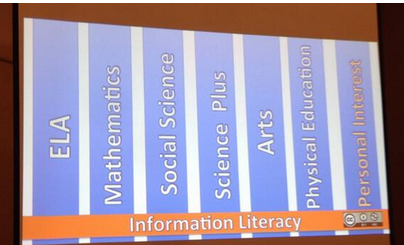
All too often in school, Glen shared during his session, we don't ask kids what they want to learn. Instead, we just tell them what they have to learn. One the great things about school libraries, is that we ask them what they want to learn, and we help them connect that to the literacies, including those covered in the Common Core, that they need to learn. Here is a graphic showing how information literacy, which librarians teach, crosses all curricular areas, including personal interest:
Glen advocated for giving students the same kind of 20 percent time  that Google provides, allowing them to pursue their own interests in that time. He also shared how he makes students accountable for their time and has them simultaneously learn and practice information literacy skills. He uses a Google Form to have them submit information about their work, including the questions they asked and the research they did.

In my session, I focused on teaching respect for intellectual property, on understanding copyright and fair use, and on taking advantage of using Creative Commons material to make that task easier. I also advocated for contributing to a creative society by licensing our own works with Creative Commons licenses and encouraging our students to do the same. Here is the presentation file:


 If you haven't already joined the Creative Commons community, please do so! By sharing, we all contribute to a more vibrant, creative world. Gwyneth Jones included this powerful message in one her slides from her Friday session on "Marketing Your Program Like Lady Gaga":


I tweeted a photo of the slide during her session, and it clearly resonated with many people, since I got lots of retweets.
I was also proud to be a part of CSLA's booth presence in the exhibit hall, promoting what teacher librarians do:

Thanks to Sue Heraper for taking the photo of me (current Past President) with Janice Gilmore-See, current CSLA President, and Pam Oehlman, 2012-2013 President.
I came away from the conference bubbling with new ideas and some fun tech tips to share. Many of these are included in my Twitter feed (I'm @jane_librarian) from March 20-22, since Twitter has become my primary note-taking method during conferences. Also check the #CUE14 hashtag for a wealth of quotes from presenters, links to sessions and tools, and more. Thanks to all the presenters for their great ideas. I've captured only a fraction of them here. Also, thanks to CUE and Executive Director Mike Lawrence for enabling CSLA to present the Digital Citizenship Summit.


Friday, February 21, 2014

CSLA 2014 Conference Highlights


California School Library Association held its annual conference, "Journey to Expertise," at the Bahia Hotel in San Diego February 6 - 9. It was jam packed with an incredible number of informative, inspiring, and entertaining sessions and events. I was involved in planning in a variety of ways, including performing miscellaneous tasks, presenting two awards, and reviewing the last year as Immediate Past President; serving as the advanced registration chair; organizing a Friday night “Unconference” with my friend Marie Slim; and presenting a concurrent session about Twitter with Marie. 

Please see my Mira Costa HS Library blog for some highlights of speakers on Common Core and college readiness. This posting focuses on the Unconference, Marie's and my Twitter session, and author events.

Unconference


The Unconference was modeled after the one organized by Joyce Valenza and a team of other rock star teacher librarians at the AASL Conference in Hartford last October. With generous permission from Joyce for the plan and Gwyneth Jones for the graphics, I copied and adapted the AASL Unconference agenda and wiki, recruited Marie to be a co-organizer and a team of several other great TLs to help. Visit our wiki here. The point of the evening was to allow everyone to share their good ideas. So often, conference attendees think they don’t have enough to offer to submit a session, or they can’t get one together before the deadline. We all have worthwhile ideas to share; this event allowed for that sharing.


We started the evening off by dividing everyone into three different groups based on a quick poll of topic interests. (There were lots of ideas proposed, but we went with three, which seemed about the right number of groups for the number of people there.) Then, for about a half hour, one group discussed ebooks and how to deal with them, another group discussed how we teach student research and what students really do, and a third learned how to make craft books from Lisa Bishop.


For the next segment, we had a fast-paced Smackdown of ideas. We invited everyone to submit slides to a Google Presentation in advance, but attendees could also share on the spot and we captured their ideas in the slides for future viewing. Do have a look at the embedded slideshow on the unconference wiki or here. The one rule, to keep things moving at a fast pace, was that each presenter had a maximum of two minutes per idea.

And, for the final activity of the evening. We had people “vote on their feet” as to whether they thought an idea rocked or stunk. For example, one of the topics was “should we still teach citation format when there are citation generators?” Interestingly, the room was pretty evenly divided between the people in favor and opposed for almost all the questions. You can see our questions in the embedded slideshow on the wiki or here.

Marie not only recorded the entire Smackdown and part of the rest of the Unconference, she also created a Storify which embeds those videos, tweets, and photos from the evening. So, even if you missed this event, you can still experience a lot of it through this record. We didn't always have screen sharing on when we should have. I learned a lot watching the videos that I will apply next time.

Twitter: "Make Twitter Your #1 Tool for Building a PLN"

Marie Slim and I are both big fans of Twitter, and use it regularly as the key component of our personal learning network to connect with other teacher librarians, classroom teachers, authors, and more. We were excited to have a good turnout at our session, and, more important, got a number of people sold on starting a Twitter account or make more use of an existing account. Here is our presentation file:

Here is a Google+ Hangout video of the session. Since we didn't screen share (I'm a newbie at this recording business, and learning as I go), you will want to watch the Prezi presentation file as you watch this video:

As part of our goal to get more California library folks tweeting, after the session I created a California school librarians Twitter list. Please check it out, and @ me on Twitter if you are a Californian and I missed including you. I'll start following you and add you to the list. Let's make the list grow. As with all public Twitter lists, you can follow it and use it as an easy way of viewing tweets from all the California school librarians without having to follow all of them yourself or create a new list.

Authors, Authors


We had an awesome collection of author panels and events at the conference. Shelley Moore Thomas, our charming CYRM Banquet speaker, enthralled us as she shared with us the serendipity of mistakes and how libraries make magic real. Her parting words to us were "the paths of our lives are filled with mistakes. May you find the magic in yours."


Our closing session speakers were the incredible Henry Winkler and Lin Oliver, who together author the Hank Zipzer series. Hank, like Winkler, suffers from learning challenges, and the books help kids deal with such challenges. Here are a couple of my tweets during this session:

As librarians, we need to remember that mission every day!

The author panels also introduced me to some new-to-me authors and books I will want to purchase for my library. 

My Birthday

And, I celebrated my birthday during the conference. What a great place to do it! Here are the lovely flowers my husband sent:
And, a kind tweet and photo from Marie during breakfast that day:


Monday, February 17, 2014

My Blog "Facelift" for 2014


A new year, a new look, name, and URL ....

Yes, I know it is already mid-February, but I am granting myself through the end of this month to address "beginning of a new year" stuff. :-) And, this is "Ski Week" at my school, or, in my case "Catch up with Everything Week." so this is the time ...

I just checked back to see when I created my first blog. It was in 2007, prompted by CSLA's School Library Learning 2.0 tutorial. Soon after that, I began maintaining a personal blog and one for my school library. Then, in Fall of 2009, my school district moved me to the classroom, and I decided to start a new blog, "TLintheClassroom.blogspot.com," to tell about my new experiences being a librarian working in the classroom setting. Definitely the highlight of that "adventure" for me was helping more than 200 language arts and computer exploratory class students I taught that year to create their own blogs, an experience I highly recommend for all students. A year later in August 2010, I moved to my current position as teacher librarian at Mira Costa High School in Manhattan Beach. I didn't want to abandon my blog, so I kept the same blog and url but renamed it "TL Back in the Library." Three and a half years later, I have been thinking it is time for a new blog url and title.

So, here's what's new:

  • A new title: "Jane Lofton's School Library Journey"
  • New URL: www.janelofton.com
  • New banner and template (still a work in progress, isn't everything?)
Here's what's not new:
  • The blog itself. I am still continuing tlintheclassroom.blogspot.com, but please update your links to my new redirect url, janelofton.com
And, FYI, you can also learn about my school library on my school blog at miracostahighlibrary.edublogs.org.

I hope you like the new banner and look, but please let me know if you have suggestions.

Thanks for visiting! And, Happy New Year! The first image above is from a photo I took of the London Fireworks from St. James Park, with thanks to Canva.com for the added text. The What's New is from quotes.prowritingaid.com.